
WakeUp
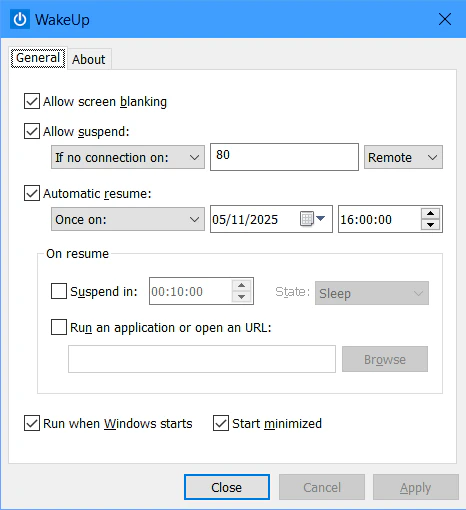
WakeUp is a free, lightweight utility designed to give you precise control over your computer’s power management. It allows you to prevent screen blanking, prevent suspend according to network activity, or schedule resume and sleep activities.
WakeUp focuses on automation without overhead — it’s small, efficient, and integrates seamlessly with Windows power management.
This program runs on Windows. Open this page on a Windows computer to download it.
Version 2.1 - 671.4 KB
Free for personal use. Donations are appreciated.
Key Features
- Screen Blanking Control
Enable or disable monitor power-down when idle to keep the display active during long processes. Perfect for monitoring dashboards or overnight tasks. - Conditional Suspend Prevention
Monitor one or more network ports (incoming or outgoing) and block system suspend as long as traffic is detected. Ideal for remote desktop sessions or file transfers. - Scheduled Resume
Wake the computer at a specific date and time (one-time), at regular intervals (hours/minutes), or daily at a set time. Flexible scheduling for any automation need. Set it and forget it. - Actions on Resume
Run a program or open a URL immediately after wake-up. Optionally enter sleep again after a defined delay. Great for automated tasks like backups or updates.